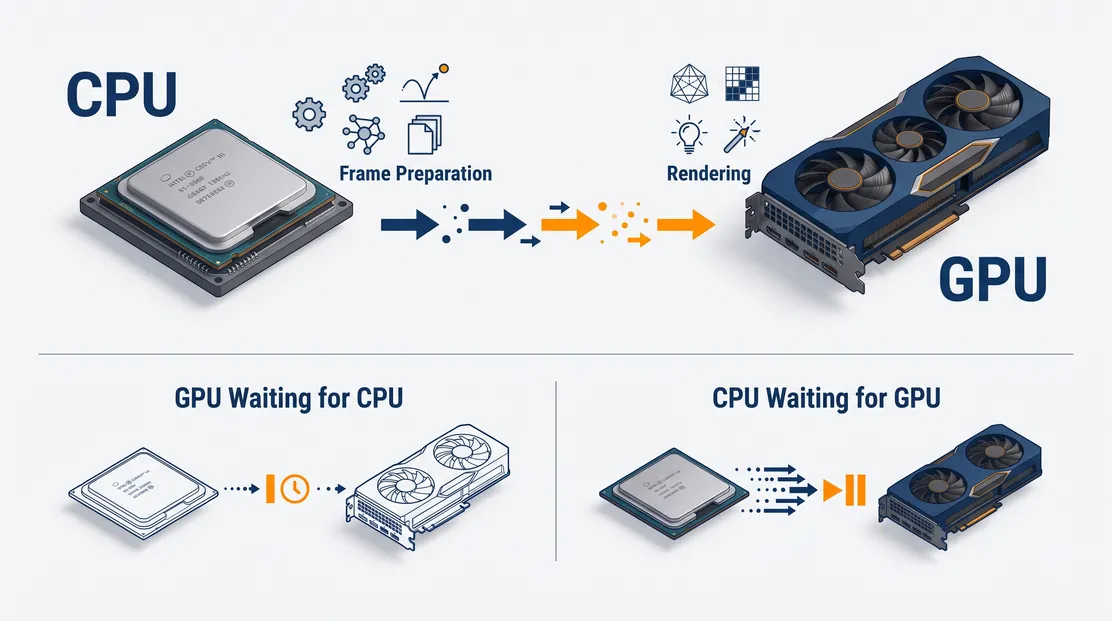
The CPU prepares each frame, and the GPU renders it. The CPU handles game logic, physics, AI, and draw calls, instructions that tell the GPU what to render. The GPU then processes this data to generate the final image, incorporating pixels, textures, lighting, and visual effects.
Every PC has a slowest component that dictates the overall speed; therefore, the goal is not to eliminate imbalances entirely. An ideal scenario involves a slight GPU limitation, this ensures that the graphics card you paid for is being fully utilized, while leaving some “headroom” for CPU spikes, background tasks, or future GPU upgrades. Being limited by the CPU, however, is undesirable, as it typically results in erratic and inconsistent frame delivery.
This page focuses on selecting the right hardware pairing. To evaluate a PC you already own, please refer to our guides on CPU bottleneck and GPU bottleneck. For help interpreting the scores provided by the calculator, consult our guide on bottleneck percentages and how we calculate your bottleneck percentage.
| Target | Main demand | Prioritize |
|---|---|---|
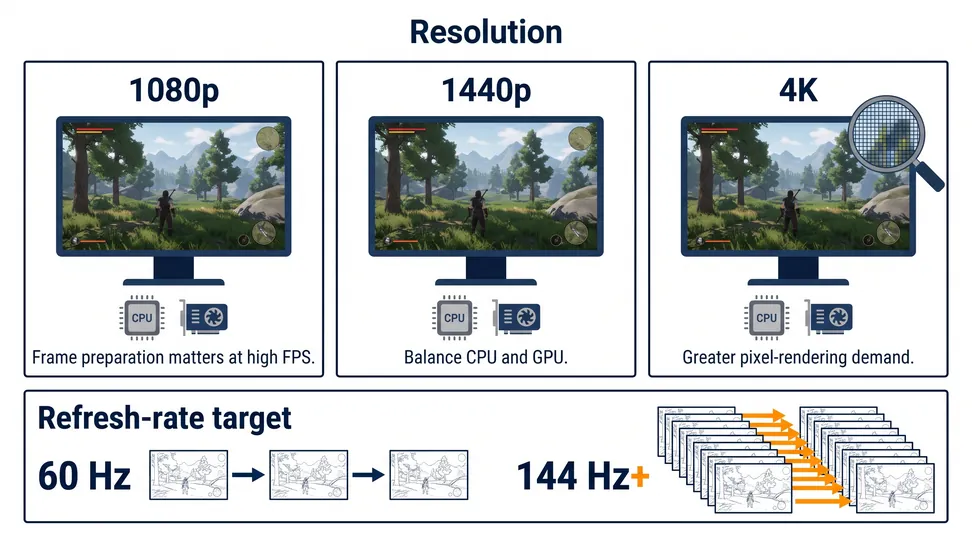
| 1080p, 144Hz or higher | Frame preparation | Strong single-core CPU, mid-range GPU |
| 1440p, 60 to 144Hz | Mixed, usually GPU-led | Balanced pair, GPU slightly ahead |
| 4K, 60Hz | Pixel work | GPU first, modern capable CPU |
At 1080p, the GPU processes frames rapidly and ends up waiting on the CPU; therefore, the CPU becomes the bottleneck. At 4K, the GPU bears the brunt of the workload, meaning even a modern mid-range CPU typically has spare capacity. Consequently, the same hardware combination might be CPU-limited at one resolution and GPU-limited at another, which is why claims about a specific hardware pairing are unreliable without specifying the resolution. If you plan to increase your refresh rate later on, ensure you have sufficient CPU headroom now.
Tier Matching: An entry-level GPU should be paired with an entry-to-mid-range CPU, a mid-range GPU with a mid-range CPU, and a high-end GPU with a high-end CPU. Depending on the resolution and refresh rate, the appropriate CPU tier may shift up or down by one level. Pairing a premium CPU with an entry-level GPU is a waste of money, as the graphics card cannot translate the CPU’s extra speed into additional frames visible on your screen.
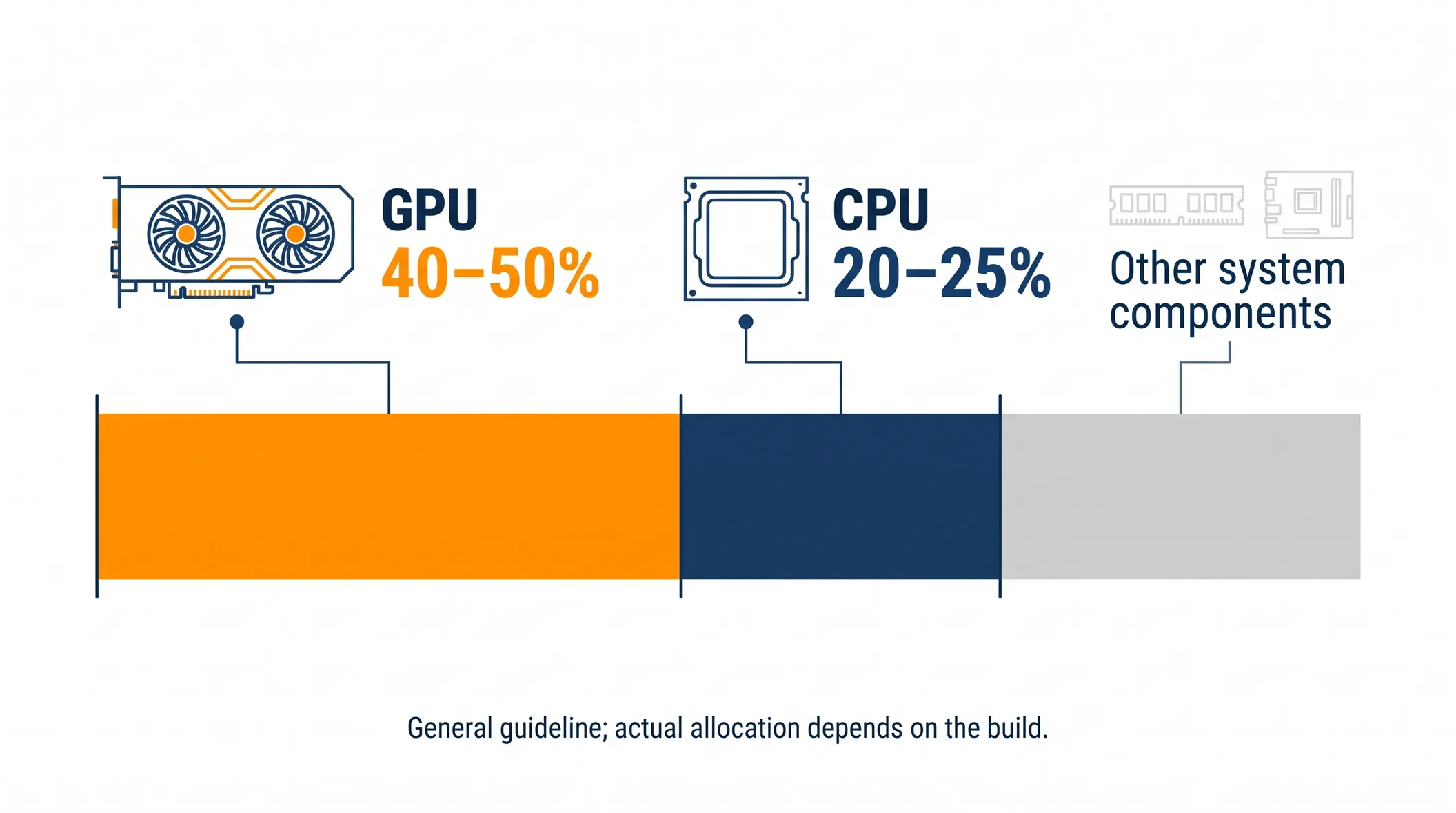
When planning to build a gaming PC, allocate approximately 40 to 50% of your budget to the GPU and 20 to 25% to the CPU; in other words, the expenditure on the GPU should be roughly 1.6 to 2.5 times greater than that on the CPU. The goal here is to establish a general guideline rather than a precise formula, the GPU should account for a larger share of the budget, but the CPU must be powerful enough to ensure it does not become a bottleneck for the GPU’s performance.
Prices checked November 2026. Prices change frequently, so be sure to check the current listings before making a purchase. The components selected here for 1080p gaming belong to the previous generation; they were chosen because they are readily available and affordable. Newer components in this same category are more expensive, yet they offer only a marginal improvement in performance at 1080p.
| Target | Tier | CPU | GPU | Approx. pair cost | Notes |
|---|---|---|---|---|---|
| 1080p value | Entry | Ryzen 5 5600 class | RX 7600 or RTX 4060 | 350 to 450 USD | 60 FPS and above at high settings in most current games |
| 1080p, newer platform | Entry to mid | Ryzen 5 7600 class | RTX 4060 | 400 to 500 USD | AM5 platform with an easier upgrade path |
| 1440p sweet spot | Mid | Ryzen 5 9600X class | RTX 5070 | 880 to 1,080 USD | GPU does most of the work, CPU keeps up easily |
| 1440p high refresh | Mid to high | Ryzen 7 7800X3D class | RTX 5070 | 950 to 1,150 USD | Cache helps in CPU-limited competitive play |
| 1440p with ray tracing | High | Ryzen 7 9800X3D class | RX 9070 XT or RTX 5070 Ti | 1,300 to 1,600 USD | For high settings and high refresh together |
| 4K | High | Ryzen 7 9800X3D | RTX 5080 | About 1,700 USD | 4K at 60 FPS and above, strong 1440p high refresh too |
At the ultra-high-end level (such as the RTX 5090), even 4K resolution can expose the limitations of a weaker CPU in some games; therefore, you should pair such a graphics card with a top-tier CPU. If you game exclusively at 4K resolution and do not utilize high refresh rates, you can save money by opting for a CPU in the class of the Ryzen 7 9700X or Core Ultra 7 265K.
X3D processors incorporate a large, stacked 3D V-Cache that keeps game data close to the cores. For instance, the Ryzen 7 7800X3D features a total of 96MB of L3 cache, which includes this stacked V-Cache. This helps improve frame rates, particularly the 1% lows, in CPU-intensive games, such as simulations, strategy titles, and competitive games.
The performance gains are most significant in CPU-limited scenarios (as shown in the resolution table) and least noticeable when the system is GPU-limited. Adding this cache does not transform a GPU into a higher-tier model; rather, think of it as a benefit for CPU-constrained scenarios and a form of “insurance” for future GPU upgrades.
As a general guideline for VRAM: 8GB is viable for 1080p; 12GB or more is safer for 1440p; and 16GB or higher is preferred for 4K, especially when using high-resolution textures. No CPU can compensate for a lack of VRAM, refer to our guide on VRAM bottleneck.
Regarding the platform: A modern platform like AM5 allows for future CPU upgrades without requiring a complete system rebuild, a significant factor if you plan to upgrade your GPU first. Choose a platform with future-proofing in mind, and always verify the socket type, memory standard, and power supply requirements before placing an order.
Power and cooling: Aim for a power supply with about 30 to 40% of headroom above the total board power; this translates to roughly 550 to 650W for 1080p builds, and 850 to 1000W for 4K builds. For graphics cards drawing over 300W, a cooling setup with at least two intake fans and one exhaust fan is recommended. As explained in our guide on thermal bottleneck, a component that cannot maintain its clock speed under load will fail to deliver its rated performance.
Streaming and creative work place an additional load on the system beyond just gaming, which shifts your priorities. A GPU with a robust hardware encoder offloads the encoding process from the CPU, while a CPU with extra cores can handle encoding and background tasks, allowing the primary cores to remain dedicated to the game. For tasks like rendering, editing, and compiling, a 16-core CPU paired with a flagship GPU is a more logical choice, even though X3D-series CPUs are faster for pure gaming.
Components from the previous generation, such as an RTX 4080 Super paired with a Core i7-14700K, still perform very well for streaming and may be available at a lower price point. If you are purchasing new hardware, opt for a current-generation GPU and a CPU with 12 or more cores. Choose a combination that best suits the tasks you perform most frequently.