
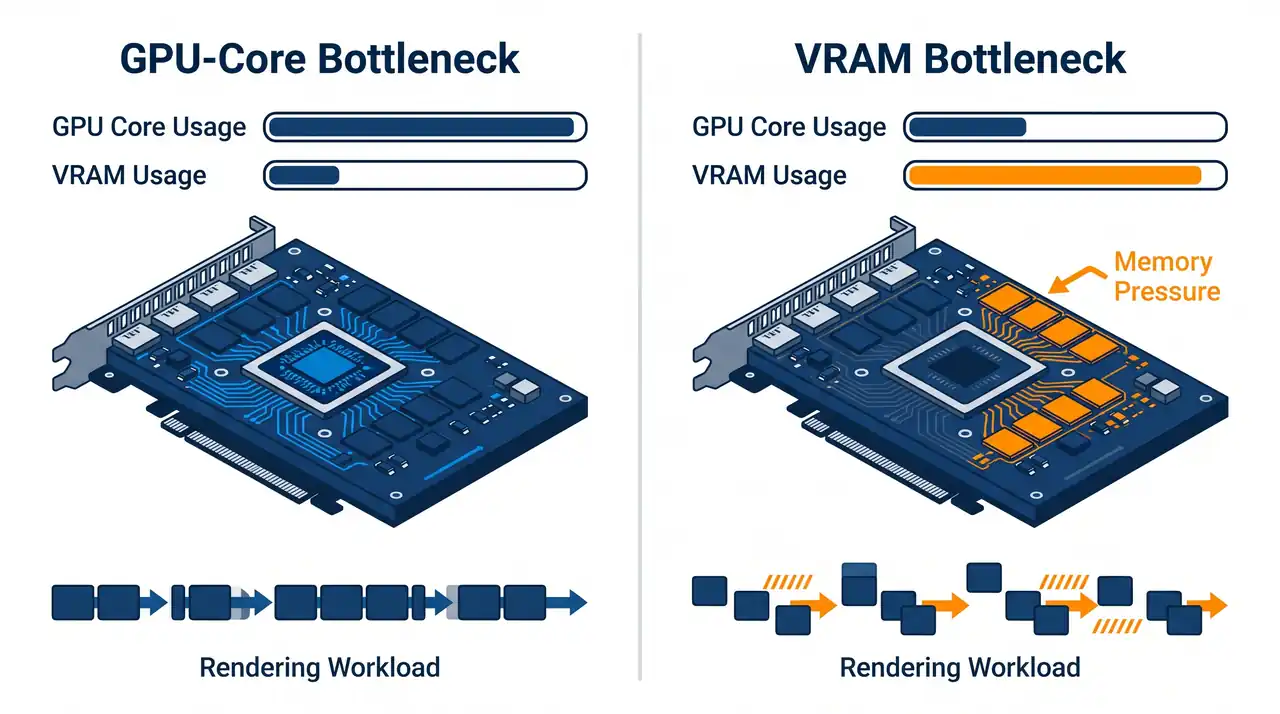
When a game requires more video memory (VRAM) than your graphics card can provide, textures may load slowly, the game may experience hitching, and your FPS can drop suddenly. This guide explains how VRAM works, how to determine if it is the cause of an issue, and how much VRAM you actually need. Since VRAM is tied to the GPU, this is closely related to a ‘GPU bottleneck,’ though the solutions differ.
Dedicated VRAM is memory soldered onto the graphics card and is used exclusively by the GPU. Shared memory is standard system RAM that Windows lends to the GPU; it is significantly slower. Game requirements refer to dedicated VRAM. Windows also displays a large “Total Available” figure that includes shared memory, so ignore this when comparing against a specification sheet.
Integrated graphics lack a dedicated memory pool and rely entirely on shared memory.

When dedicated memory fills up, the GPU retrieves missing data from system memory via the PCIe bus, forcing the CPU to step in and supply it. Each such retrieval stalls the rendering pipeline.
Related causes: Slow asset loading from storage, often due to a bottleneck within the drive itself, refer to the storage bottleneck guide. A slow data path, distinct from simply having insufficient capacity, is a PCIe bottleneck. A CPU that cannot keep pace with the GPU is covered in the CPU bottleneck guide.
A typical benchmark shows a healthy average FPS, but with 1% lows that drop significantly. The game stutters at specific moments, such as when entering a detailed area, rotating the camera, or loading high-resolution assets.
As a general rule, consistent usage exceeding 90% indicates that you are nearing the limit, while usage at 95% or higher can cause stuttering due to the game’s streaming demands. Consider these as warning signs rather than definitive proof (see the next section).
There are other potential causes for stuttering. If clock speeds drop as temperatures rise, consult the Thermal bottleneck guide before attributing the issue to VRAM. For more on frame rates, see the FPS Bottleneck guide.

Many engines reserve memory that they do not actually need. The Call of Duty engine is notorious for claiming the vast majority of available VRAM when set to high settings. Testing reveals that in Black Ops 6, more than 10GB of memory was allocated at 1080p resolution, despite this, there was no drop in performance for cards with lower VRAM.
Therefore, do not base your assessment solely on the numbers. Correlate the readings with actual symptoms, such as stuttering, blurry textures, or drops in the “1% low” frame rate. High VRAM usage is not an issue unless accompanied by these problems.
| Factors | GPU bottleneck | VRAM bottleneck |
|---|---|---|
| VRAM usage | Comfortable | At or near the limit |
| What you feel | Consistently lower FPS | Hitching, pop-in, bad 1% lows |
| GPU core usage | Near 100% | Often low |
| Lowering settings | Raises FPS broadly | Helps mostly when textures drop |
Testing highlights the significance of this issue: in games that demand more memory (VRAM), the 12GB RX 6700 XT performed better than the more powerful 8GB RTX 3070 Ti. If your GPU core is operating at its maximum capacity while there is still sufficient memory available, it means your system is GPU-limited, which is a better and more desirable scenario. For further details, please refer to our GPU bottleneck guide.
Resolution sets the baseline: a 1080p frame contains only 2 million pixels, 1440p has approximately 3.7 million, and 4K exceeds 8 million. The figures below assume modern AAA games running on high settings. Esports titles and older games have significantly lower requirements. For the aspect concerning resolution-related limitations, see the resolution bottleneck guide.
| Resolution | Minimum | Recommended when buying new (2026) | Notes |
|---|---|---|---|
| 1080p | 8GB | 12GB | Use high, not ultra, textures on 8GB |
| 1440p | 12GB | 16GB | Ray tracing adds real memory pressure |
| 4K | 16GB | 16GB or more | The heaviest ray-traced games can pass 16GB |
Three factors have converged: textures have become more demanding, ray tracing and frame generation have increased memory overhead, and console ports have begun to require larger memory pools. Many games released in 2024-2025 now allocate more than 8GB of VRAM, even at 1080p resolution with high-quality textures.
The performance penalties are measurable:
Our stance: 8GB is still enough for 1080p gaming in most games, provided you keep texture settings at High rather than Ultra and are willing to make occasional compromises. A few newer titles already need more even at 1080p, as the Indiana Jones crash at Ultra settings above shows, and at 1440p the minimum rises to 12GB, as the table above states. If you are purchasing a new card and intend to keep it for several years, 12GB is the safer choice.
When it comes to rendering, video editing, and running local AI models, a project either fits into the video memory (VRAM) or it doesn’t. Generally, capacity is more important than speed; this is why a relatively slower card with 16GB of VRAM can outperform a faster card with only 12GB.
Textures are the single biggest factor. A 2048×2048 texture, including mipmaps and using a standard compressed format, occupies about 5-6 MB (roughly 20 MB uncompressed), and a modern scene can contain thousands of them. In demanding games, lowering settings from “Ultra” to “High” often saves several gigabytes of VRAM (typically 2 to 4 gigabytes), while the resulting difference during gameplay is virtually imperceptible. This is precisely why the “Ultra” preset is the first thing to overwhelm 8 GB graphics cards.
Ray tracing and path tracing require memory for acceleration structures that store geometry and lighting data; path tracing is particularly resource-intensive. If you are limited by VRAM, ray tracing is the next setting, after textures, that you should consider disabling.
Other factors that add to the load include resolution and various settings such as shadow maps, draw distance, post-processing, and mods.
Background applications also draw from this same pool of memory. A browser with hardware acceleration, Discord, OBS, or an editor left running in the background can easily consume a gigabyte or more. Check the “GPU memory” column for each process in Task Manager and close anything you don’t need.
They work in opposite ways.
Find your total: Go to Settings > System > Display > Advanced display > Display adapter properties and check the “Dedicated video memory” value. You can also run `dxdiag` (under the Display tab) or use GPU-Z.
Monitor it in real-time: In Task Manager, the “Performance” > “GPU” tab shows the dedicated memory currently in use, while the “Details” tab breaks this down by individual process. For in-game data, MSI Afterburner (combined with RTSS) can display VRAM usage alongside frame times. If possible, log an entire session, as the usage limit may fluctuate when the scene changes.
Beyond simply observing higher readings in new areas, “hitching” (stuttering) serves as a diagnostic indicator. A high reading on its own is just a number.

Test after each change so you can identify what actually led to an improvement.
When VRAM reaches its maximum capacity and the GPU core sits idle, no setting can fully resolve the issue. Purchase a card suitable for the resolutions you intend to use over the next few years. A card with more memory generally offers better long-term performance than a faster chip with less memory; however, do not pay a premium for extra memory on a GPU that is too weak to effectively utilize it. Before you buy a new card, see how to pair a CPU and GPU so the new card fits the rest of your system.
To be honest, having 32 GB of VRAM solely for gaming is completely unnecessary, it is an "overkill." Even the most demanding games rarely utilize more than 16 GB. Such capacity is only required for tasks like 8K resolution, intensive ray tracing, large-scale mods, AI-related workloads, or rendering. For standard gaming, it won't provide any extra FPS; instead, it simply offers "headroom" that will likely remain unused in most games. Therefore, spending extra money on it is not a wise decision.
No, 16 GB of VRAM is no longer considered overkill. It is the "sweet spot" for 1440p resolution and serves as the minimum recommended amount for smooth gaming at 4K. While it may be more than necessary for 1080p esports gaming, in modern AAA titles, it helps prevent stuttering and ensures you are set for the next few years, all without needing to invest in an expensive "flagship" or top-tier graphics card.
Yes, for most users, 24 GB of VRAM is overkill when gaming at 1080p or 1440p resolutions. This is only necessary when you are gaming in 'Ultra 4K' with ray tracing, using very large texture packs, or performing AI and rendering tasks. Otherwise, a good 16GB card can handle these same games perfectly well, allowing you to save your money and invest it in a better CPU or storage instead.
More VRAM is only beneficial up to the point where you have the amount actually required. Beyond that threshold, it has no impact on FPS; a weak GPU will remain weak, regardless of how much VRAM it has. However, if you run out of VRAM, the game will start to stutter, objects may suddenly 'pop in,' and the game might even crash because the system is forced to rely on slower 'system RAM.' Therefore, ensure you have enough VRAM for your chosen resolution and settings, but do not simply chase higher VRAM capacity for its own sake.
For proper 4K gaming, 16GB is the absolute minimum you should aim for. You might get by with 12GB if you dial back some settings and utilize DLSS or FSR, but enabling ultra-quality textures and ray tracing will quickly exhaust that capacity. If you want to play at 4K Ultra settings without any compromises, especially considering the demands of AAA titles and future game releases, then 20GB to 24GB is a comfortable choice.
For most games, yes. 8 GB is still enough for 1080p gaming, provided you keep texture settings at High rather than Ultra and are willing to make occasional compromises. A few newer titles already need more even at 1080p, and at 1440p the minimum rises to 12 GB. If you are buying a new card and intend to keep it for several years, 12 GB is the safer choice.
Yes, for modern AAA games, 4GB of VRAM has become essentially insufficient. While it may still work for older games or esports titles at 1080p (using low to medium settings), newer titles will force you to compromise on visual quality, cause significant stuttering, or, in some cases, fail to launch altogether. Today, no one should purchase a card with only 4GB of VRAM for AAA gaming; 8GB is currently the absolute minimum for a smooth experience.